
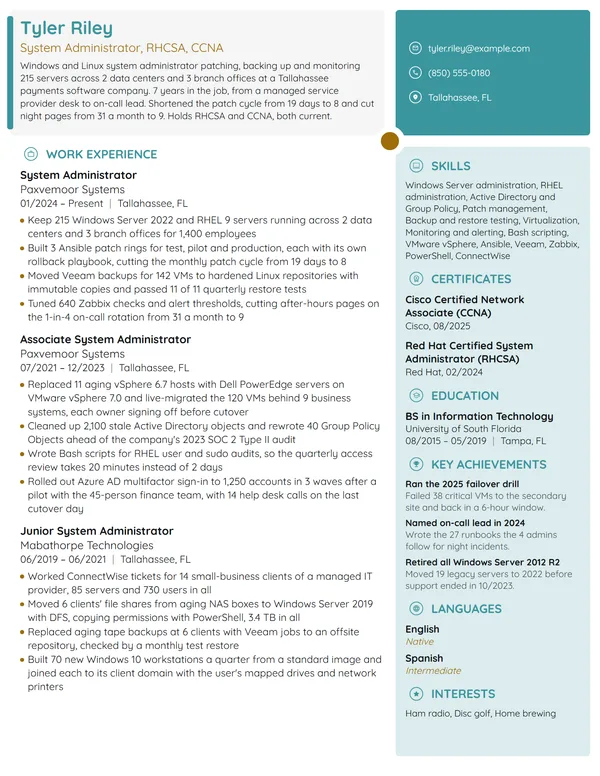
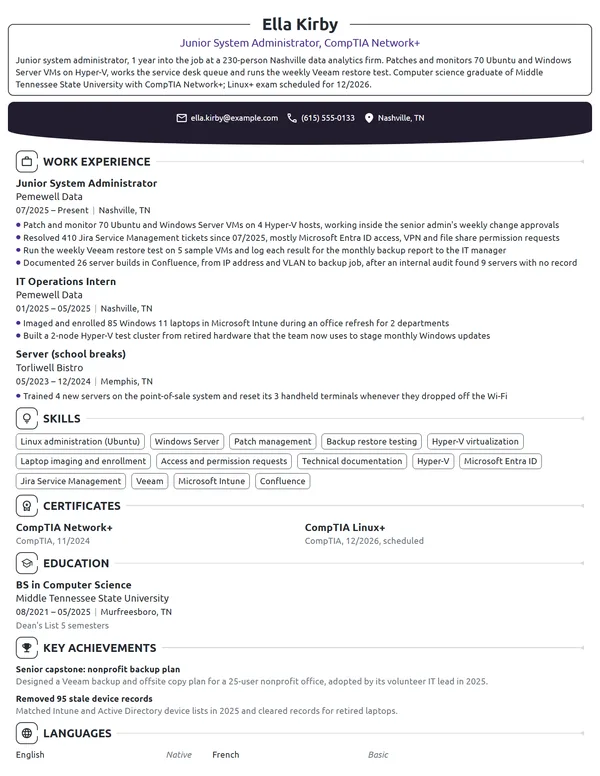
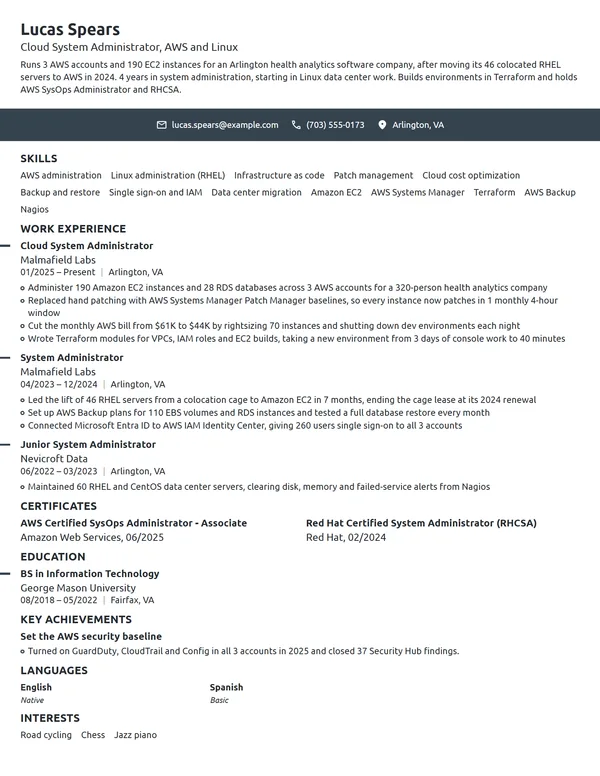
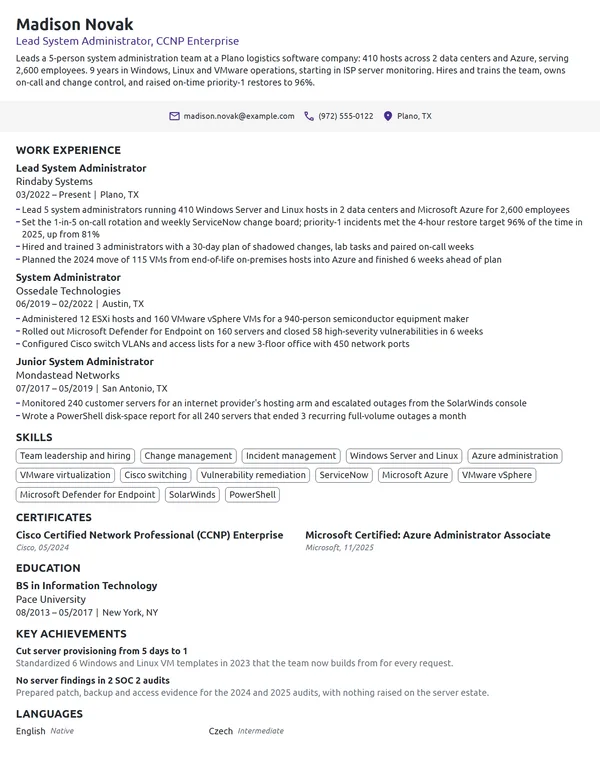
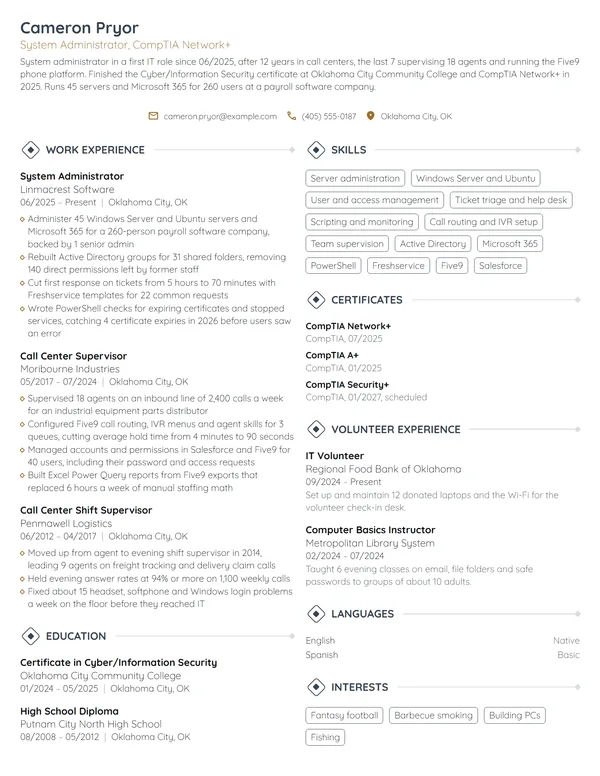
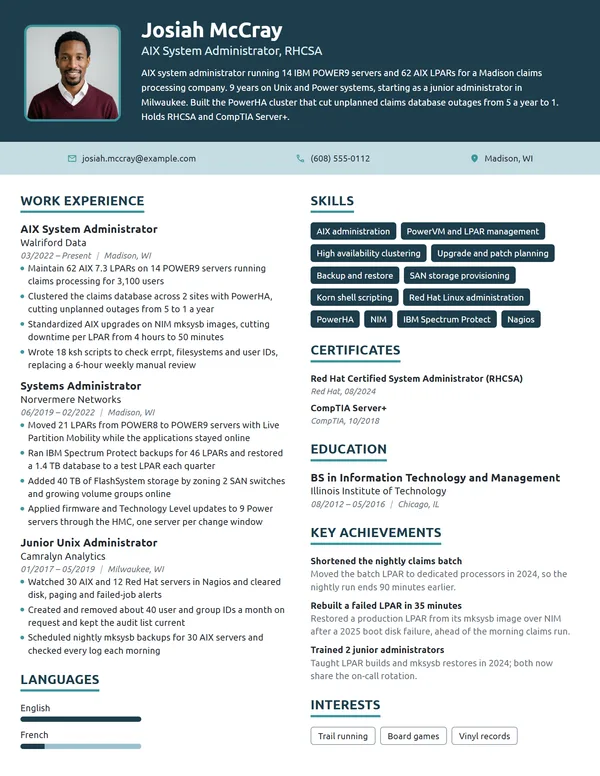
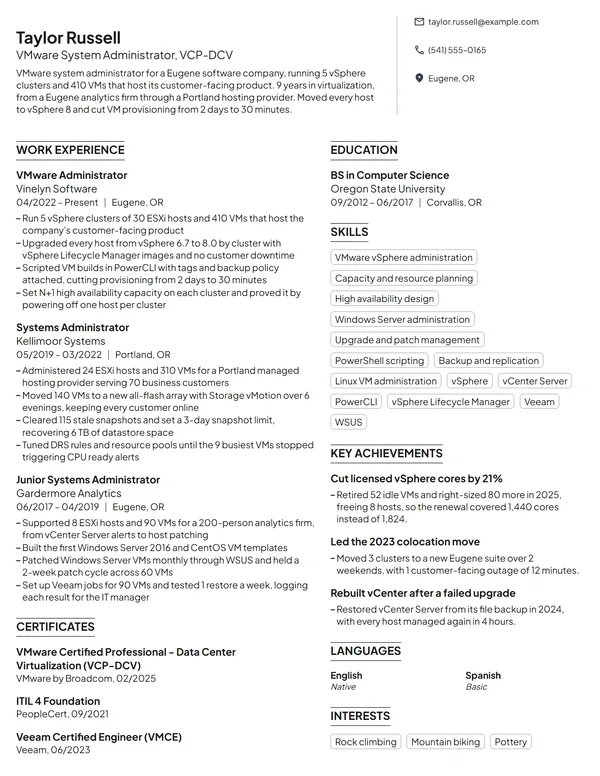
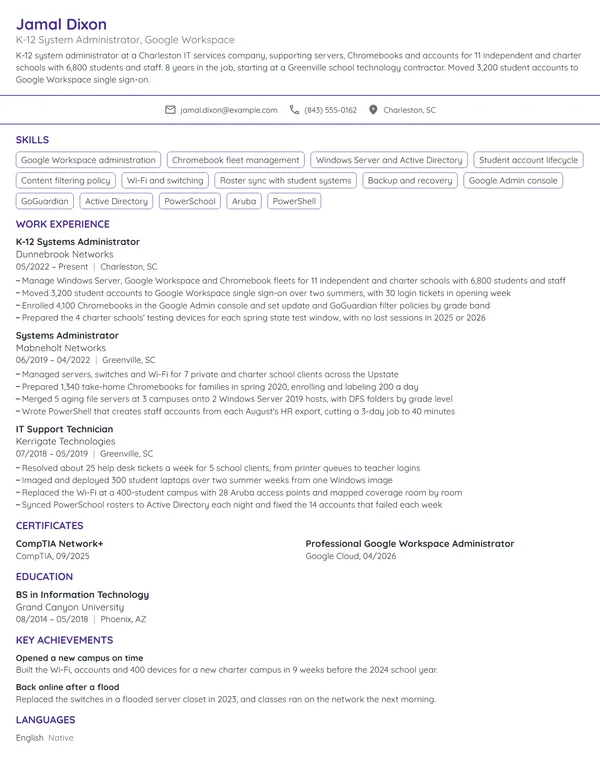
System administrators keep servers patched, backed up and running for everyone else in the company. The first questions about an applicant are about scale: how many servers and users, which operating systems and cloud platforms, and how fast things came back when something failed. After that comes what changed once you took over, such as patching that now runs on a schedule, a restore that worked on the first try, or the hours a script handed back to the team.
How to Write a System Administrator Resume - Key Takeaways
- Order your jobs newest first in a reverse-chronological layout, on 1 page, or 2 after 10+ years or several environments.
- Open with 2 to 3 lines that give your years, your platforms, the size of the environment and 1 measured result.
- Start each job with the scale (servers, users, sites), then back it with patch, backup, uptime and automation figures.
- Write operating systems and tools by their exact names, such as Red Hat Enterprise Linux, Windows Server, Active Directory and Ansible, and use each one in a bullet.
- Put vendor certifications under Certificates with the month earned, and the renewal date on Microsoft and AWS credentials.
- Keep the layout plain, then score it in an ATS resume checker before you send it.
What IT managers look for in a system administrator resume
The BLS describes the job as installing the hardware and software an organization needs, keeping its systems secure, and fixing problems when a user or a monitoring tool raises them. O*NET rates network security measures and data backups with disaster recovery as the 2 most important tasks. An IT manager reads your resume to find out how big your environment was and whether those tasks went well under your care.
Lay the resume out with section names that any applicant tracking system recognizes:
- Name, headline (such as Linux System Administrator, RHCSA) and contact details
- A summary of 2 to 3 lines under your name; it prints without a heading
- Work Experience, latest job on top
- Skills, with your operating systems, platforms and scripting languages
- Certificates
- Education
- If space allows: Languages, and either Key Achievements or a Volunteer Experience block
Best format for a system administrator resume
Choose the reverse-chronological resume format: your latest job at the top, each entry carrying title, employer and city, with MM/YYYY dates. Admin careers usually climb from help desk or desktop support to junior admin, system administrator and senior or lead, and this order puts that climb where a reader expects it. Keep it even if you came from another field, since your first IT job still belongs at the top.
- Best for most system administratorsReverse-chronologicalYour jobs, newest first, with your results under each one.Best for: A steady work history in your field
- FunctionalSkills grouped up top, with a short work history below.Best for: Gaps or very little experience
- CombinationA skills section first, then your full work history.Best for: A career change with strong skills
Fit it on 1 page while you have under 10 years in IT. A senior system administrator who has run several data centers, migrations or platforms can use 2 pages, provided the current and previous roles both sit on page 1.
| Setting | What to use |
|---|---|
| Length | 1 page under 10 years in IT; 2 pages after that |
| Dates | MM/YYYY for each job; Present for the current one |
| Job title line | The title your employer gave you, such as Systems Administrator or Linux Administrator |
| Environment | Server count, user count and sites, stated at the top of each job |
| Typeface | One clean sans serif, 10 to 11 pt in the body and larger for your name |
| Photo and private data | Leave the photo off, as hiring teams in the US and Canada expect; no date of birth, marital status or SSN |
| File type | PDF, or a Word file if the application portal asks for one |
Most US and Canadian resumes carry no photo. In IT hiring the first reader is often a keyword search, so a single-column layout with standard headings gets your server and platform names read correctly.
System administrator resume summary vs. objective
Ask one question: have you held a job where servers were yours to run? If yes, write a resume summary with your years, platforms, environment size and a result. If you are still on a help desk or coming from another field, write a resume objective that names the admin role you want and the closest proof you have. Write it after your bullets, so its number comes from them.
System administrator resume summary formula
Title with X years running operating systems and platforms for users or servers. Your best patching, recovery, uptime or automation figure. Certifications.
Example
System administrator with 7 years running Windows Server, RHEL and VMware for a 1,150-user insurer. Raised on-time patching across 180 servers from 61% to 97% with Ansible and WSUS. CompTIA Server+, RHCSA and Microsoft Certified: Azure Administrator Associate.
Don't
Results-driven IT professional with strong troubleshooting skills, looking for a system administrator role where I can grow.
Do
Linux system administrator with 4 years at a regional web host, managing 300 RHEL and Ubuntu servers through Ansible. Brought average patch time down from 21 to 6 days. RHCSA since 2024.
The second version gives the platform, the fleet size, a measured change and a credential.
How to write system administrator work experience bullets with numbers
Your current job gets 3 to 4 bullets; each older one gets 1 to 4, and every bullet leads with an action verb. Admin work already leaves numbers in your patch reports, backup logs, monitoring dashboards and ticket queue, so pull them from there. Write achievements on your resume that show what changed because of you, not the duties from your job posting.
| Area | What to count | Example bullet |
|---|---|---|
| Patching | Servers in scope, days to patch, compliance rate | Patched 260 servers within 10 days of Patch Tuesday for 12 months running. |
| Backups and recovery | Restore tests, restore time, data size | Tested restores of 40 critical VMs each quarter, each one back online in under 2 hours. |
| Uptime and incidents | Uptime percentage, outages, time to restore service | Kept the ERP cluster at 99.95% uptime through 2025. |
| Automation | Scripts written, tasks automated, minutes or hours saved | Automated new-hire account setup in PowerShell, from 45 to 5 minutes per user. |
| Identity and access | Accounts, MFA coverage, audit findings | Enrolled 900 accounts in MFA through Microsoft Entra ID and closed 2 audit findings on stale accounts. |
| Migrations and upgrades | Servers or VMs moved, weekends used, unplanned downtime | Moved 48 VMs from vSphere to Azure over 5 weekends with no unplanned downtime. |
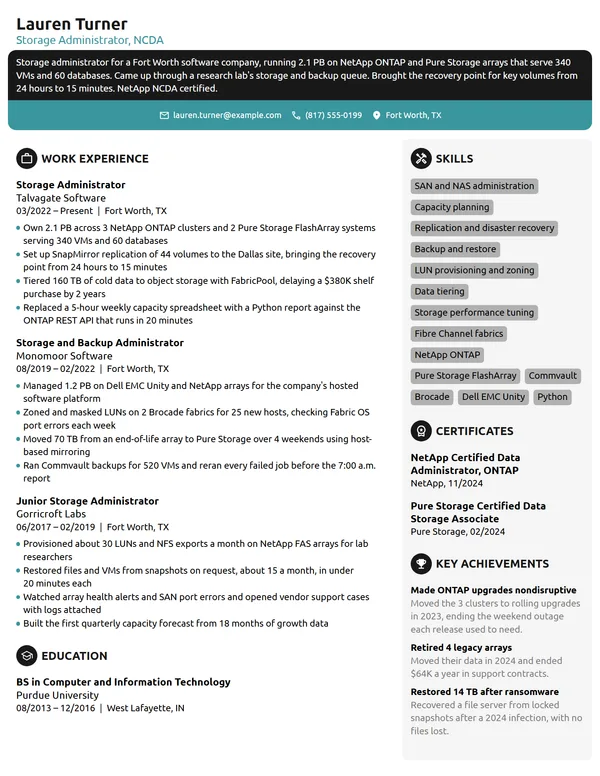
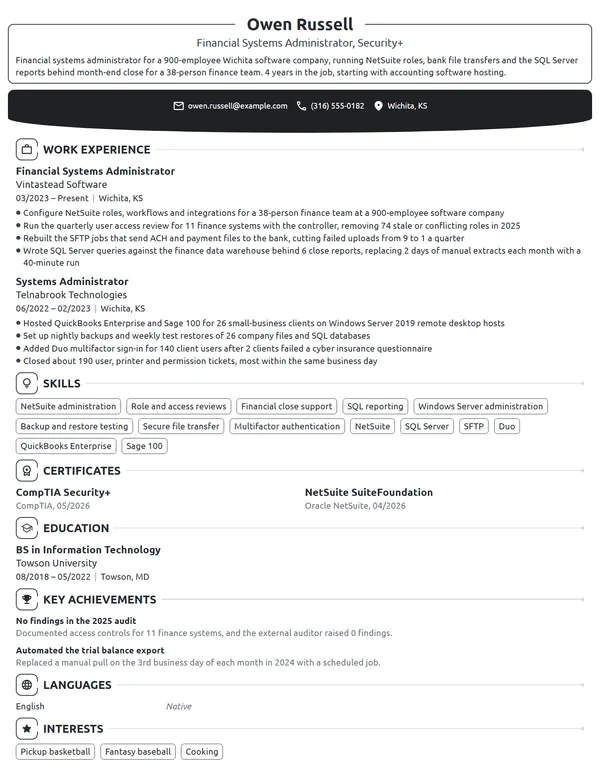
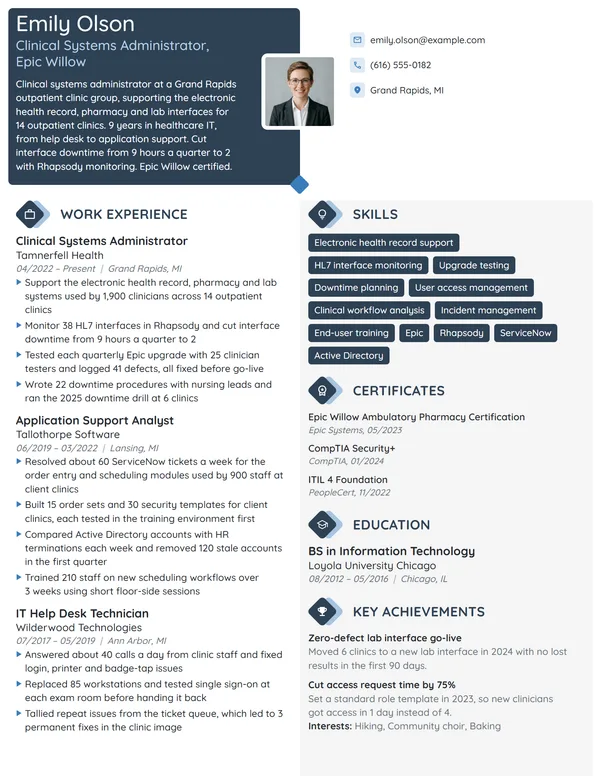
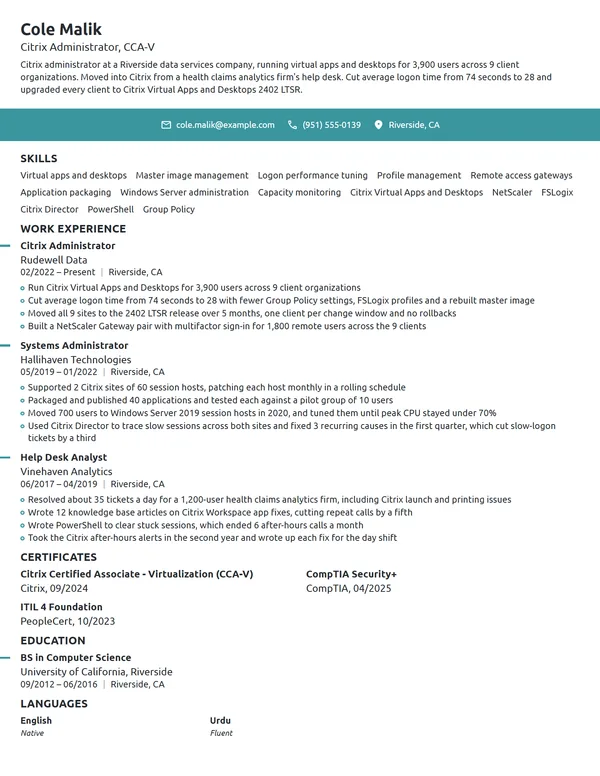
Below is one admin's Work Experience with those numbers filled in. The first bullet of each job sets the size of the environment, and the earlier job gets fewer lines.
Work Experience
- Administer 180 Windows Server and Red Hat Enterprise Linux servers, 130 of them virtual on VMware vSphere, for 1,150 users in 4 offices.
- Raised servers patched within 14 days of release from 61% to 97% by moving monthly patching to an Ansible and WSUS schedule.
- Restored a 2.3 TB claims file share in 3 hours during the company's 2025 recovery test, using Veeam.
- Wrote 22 PowerShell scripts for Active Directory account changes, saving the service desk about 10 hours a week.
- Supported 35 servers and 420 users across 2 food plants and the head office.
- Moved 380 mailboxes from Exchange 2010 to Office 365 over 6 weekends.
Don't
Responsible for maintaining servers and backups.
Do
Ran Veeam backups for 75 VMs and lifted the weekly job success rate from 88% to 99.6% by moving jobs off the production storage network.
This version gives the tool, the scope and a change a manager can check.
Don't
Worked on the Windows Server upgrade project.
Do
Upgraded 34 servers from Windows Server 2012 R2 to Windows Server 2022 in 4 months, with 1 rollback.
System administrator skills, operating systems and tools for your resume
Choose 6 to 8 hard skills for your resume that both the job ad and your bullets mention. Patching, backups and identity management fit almost every admin resume; clustering, storage arrays or container platforms only if you have run them yourself.
Hard skills for system administrators
- Windows Server administration
- Linux administration (RHEL, Ubuntu)
- Active Directory and Group Policy
- Patch management
- Backup and disaster recovery
- Virtualization (VMware vSphere, Hyper-V)
- PowerShell and Bash scripting
- Configuration management (Ansible)
- Monitoring and alerting
- Azure or AWS administration
Soft skills IT managers value
- Calm troubleshooting during outages
- Clear change and incident notes
- Explaining fixes to non-technical users
- Prioritizing a busy queue
- Reliability on call
- Care with access and data
Your technical skills go inside the Skills section, then reappear in your bullets, where the reader sees what you did with them. O*NET lists Microsoft Active Directory, Red Hat Enterprise Linux, Microsoft Windows Server, PowerShell, Bash, Ansible, ServiceNow, Azure and AWS among the in-demand technology for this occupation. Write current product names for work you do now: Microsoft Entra ID has been the name for Azure Active Directory since 07/2023, so work done before then can still say Azure AD.
RHCSA, CompTIA, Azure and AWS: system administrator certifications
Employers may require certification in the products they use, the BLS says, and the programs come from vendors or from vendor-neutral providers. Match yours to the platforms in the posting, and list certifications on your resume under Certificates, naming who issued each one and the month you passed. RHCSA proves Linux work, Microsoft credentials prove Windows and Azure work, and CompTIA gives a vendor-neutral base on any platform.
| Credential | Issued by | What it takes |
|---|---|---|
| CompTIA Server+ | CompTIA | Pass exam SK0-005. CompTIA recommends A+ or equivalent knowledge and 2 years of hands-on work in a server environment. |
| CompTIA Linux+ | CompTIA | Pass exam XK0-006. CompTIA recommends 12 months of hands-on experience with Linux servers. |
| Red Hat Certified System Administrator (RHCSA) | Red Hat | Pass EX200, a performance-based exam in which you configure storage, users, services, SELinux and the firewall on a live system. |
| Microsoft Certified: Azure Administrator Associate | Microsoft | Pass exam AZ-104, then renew every 12 months through a free online assessment on Microsoft Learn. |
| AWS Certified CloudOps Engineer (Associate) | Amazon Web Services | Pass exam SOA-C03; AWS recommends about 1 year of running workloads on AWS. Valid for 3 years. |
How to list renamed and renewable certifications
Write a certification under the name it carried when you earned it. AWS renamed SysOps Administrator (Associate) to CloudOps Engineer (Associate) in 09/2025 and does not require earlier holders to retest, so a 2024 certificate stays SysOps Administrator on your resume. For a Microsoft credential, add the month of your latest renewal, and list an exam you have booked with its date.
Certificates
- Microsoft Certified: Azure Administrator Associate, Microsoft, earned 03/2024, renewed 03/2026
- Red Hat Certified System Administrator (RHCSA), Red Hat, 04/2023
- CompTIA Server+, CompTIA, 09/2020
- AWS Certified CloudOps Engineer (Associate), Amazon Web Services, exam scheduled 12/2026
How to list an IT degree, associate degree or certificate
The typical entry route, per the BLS, is a 4-year degree related to computer or information science, while some employers accept a postsecondary certificate or an associate degree. O*NET's survey of the occupation leans the other way: 30% of respondents say a new hire needs an associate degree, 27% a bachelor's degree and 20% a postsecondary certificate. Any of the three works on your resume when your experience and certifications carry the rest.
Apply the standard advice on listing education on a resume: write the degree, then the school and its city, and the month you graduated. Add a GPA only while you are within 2 years of graduating and it is 3.5 or higher, and drop it once you have an admin job. A coding bootcamp or a college IT certificate gets its own entry here, just like a degree.
Education
Entry-level and career-change system administrator resumes
Many admins start on a help desk or in desktop support, and that job is your strongest evidence. With no admin title yet, use an entry-level resume layout: an objective, then your IT work, then Education and Certificates. Give each item the same kind of count a full admin job would get.
- Help desk or desktop support jobs: users supported, Active Directory and Microsoft 365 tickets closed, servers you were allowed to touch.
- IT internships: servers built, scripts written, the change process you worked inside.
- IT work for a school, church or nonprofit: devices, users and backups you ran, listed under Volunteer Experience.
- A home lab: the hypervisor, the servers and what runs on them, described in 1 line of your objective or under Key Achievements.
- Certificates: Network+, Server+, Linux+ or an exam date you have booked.
Don't
Motivated IT graduate seeking an entry-level system administrator position to build my skills.
Do
Help desk technician with 2 years resolving Active Directory and Microsoft 365 tickets for 600 users, seeking a junior system administrator role. CompTIA Server+ certified, with a 3-server Proxmox home lab.
Even an objective needs a user count, a platform and a credential.
Moving over from another career, stay with reverse-chronological order, and open with the IT parts of your old job: the phone system you configured, the user accounts you managed, the reports you automated. A career-change resume works when those bullets lead each older entry and your certificate or IT program sits high on the page. Explain the switch in the cover letter; our IT cover letter examples show how to fit it into a short paragraph.
System Administrator resume FAQ
Should my resume say System Administrator or Systems Administrator?
Use the title your employer gave you in each job entry, and match the posting's spelling in your headline and summary. The two spellings name the same job, and O*NET lists Systems Administrator, Server Administrator and IT Systems Administrator among the titles for this occupation.
How long should a system administrator resume be?
Use 1 page while you have under 10 years in IT. After that, or once you have run several data centers or platforms, 2 pages work as long as your 2 latest jobs sit on page 1 and older help desk roles shrink to 1 bullet each.
Which certifications help a system administrator resume most?
The ones that match the employer's platforms. RHCSA or CompTIA Linux+ for Linux environments, Microsoft Certified: Azure Administrator Associate for Microsoft and Azure shops, AWS Certified CloudOps Engineer (Associate) for AWS, and CompTIA Server+ or Network+ as a vendor-neutral base early in your career.
Do I need a degree to become a system administrator?
Not always. The BLS names a 4-year computer or information science degree as typical, though some employers accept an associate degree or a postsecondary certificate. In O*NET's survey, 30% of respondents named an associate degree as what a new hire needs.
Should I put a home lab on my system administrator resume?
Only while you have no admin job yet. Describe it in 1 line of your objective or under Key Achievements, with the hypervisor, the number of servers and what you run on them. Once you hold an admin title, your work bullets replace it.
How do I show on-call and after-hours work on a sysadmin resume?
Write it into a bullet with a number: your rotation, such as 1 week in 4, the incidents you handled, and how quickly service came back. Maintenance windows count too, such as upgrades done over a set number of weekends with no unplanned downtime.
Should I list every operating system version I have worked with?
No. Name the platform families in Skills, such as Windows Server and Red Hat Enterprise Linux, and give a version only where it matters to the result, like an upgrade from Windows Server 2012 R2 to 2022. Versions you have only read about stay off.
Should I include salary expectations on a system administrator resume?
No. Leave pay talk for the interview or the salary field of an online application. For a benchmark, BLS data put the median yearly pay of network and computer systems administrators at $99,130 in May 2025, and offers vary with region, industry and platform.
Next steps
Pick the example nearest your level and platforms, keep its order, and swap in your own server counts, patch rates, restore times and scripts. Build it in the Novoresume resume builder, or begin with one of the resume templates, and put the strongest of those numbers in the first paragraph of your cover letter.