
A UX designer makes products easier to use, and a resume for the job gets judged by the same standard. A design manager scans it for your research methods, your tools, the products you shipped and what changed for users after launch. Your portfolio holds the full case studies, so the resume carries the short version: one line per project with the problem, your part in it and a number, such as a higher task completion rate or fewer calls to support.
How to Write a UX Designer Resume - Key Takeaways
- Put your newest role first (reverse-chronological order) and fit it on 1 page; lead, principal and head-of roles with 10+ years can run to 2.
- Write each bullet as a one-line case study: the problem, the method you used and the result for users, with a number.
- Count the things UX teams measure, such as usability sessions, task success, conversion, support contacts and accessibility issues closed.
- List Figma and your research tools with your skills, and name each one again in the bullet where you used it.
- Put your portfolio link in the header next to your email and phone, and make your bullets describe the same projects.
- Keep the layout clean and test the file with an ATS resume checker before you apply.
What design managers look for in a UX designer resume
A design manager reads your resume to learn 3 things: how you find out what users need, how you turn that into screens and flows, and whether the result held up once real people used it. The BLS describes digital designers as people who develop, create and test a website or interface's layout, functions and navigation for usability. O*NET adds identifying problems uncovered by testing or customer feedback, and reworking design concepts from stakeholder feedback. Bullets that show research, iteration and a measured outcome answer all 3 questions.
Build the page from these sections, with standard headings so screening software maps each one correctly:
- Name, a headline such as UX Designer, Healthcare and SaaS, plus your email, phone, city and portfolio link
- Profile: 2 or 3 lines below the headline, printed without a section title
- Work Experience, in reverse order of dates
- Skills, with Figma and your research tools listed among them
- Certificates, such as the NN/g UX Certification or the Google UX Design Professional Certificate
- Education, including a bootcamp if it ran for months
- Optional extras: Key Achievements, Volunteer Experience, Languages or Interests
Best format for a UX designer resume
Choose the reverse-chronological resume format, so the role you hold now opens the page and each earlier job follows with its employer, location, and start and end months. UX careers are read as a climb from junior to senior, lead and principal, or across into managing a design team, and this order makes that path easy to follow. It also works if you switched into UX, because your first design role sits on top and your earlier career below it.
- Best for most UX designersReverse-chronologicalYour jobs, newest first, with your results under each one.Best for: A steady work history in your field
- FunctionalSkills grouped up top, with a short work history below.Best for: Gaps or very little experience
- CombinationA skills section first, then your full work history.Best for: A career change with strong skills
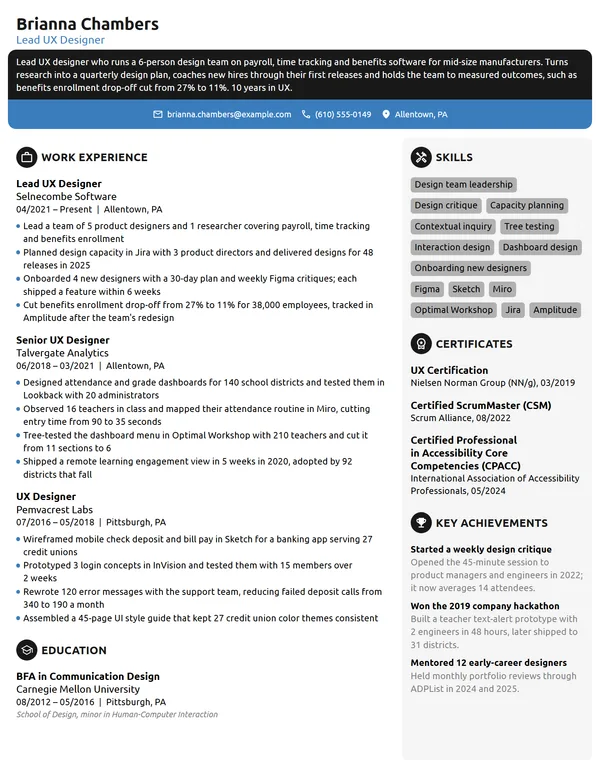
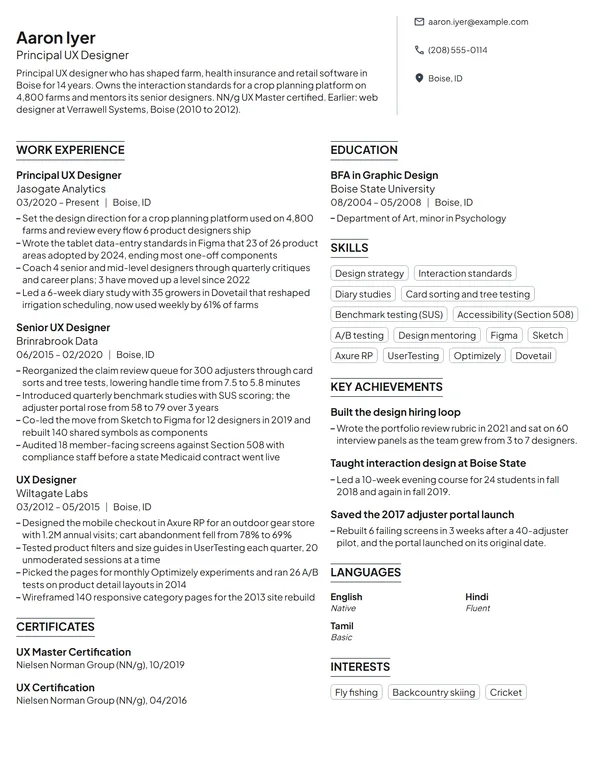
Fit the page to 1 sheet while your UX career is under 10 years long. A senior UX designer or a lead, principal or head of UX with 10+ years and several products can use 2 pages, provided page 1 holds the 2 newest roles and the strongest results.
| Setting | What to use |
|---|---|
| Length | 1 page below 10 years; 2 pages for lead, principal and head-of roles |
| Dates | Month and year (MM/YYYY), and Present for the role you hold now |
| Layout | A clean 1- or 2-column template; keep visual experiments for the portfolio |
| Portfolio link | In the header next to your email and phone, and in the form's portfolio field |
| Type | Arial, Calibri or another standard sans serif, 10 to 12 pt for body text |
| Photo | Left off by most US and Canadian applicants, together with birth date and marital status |
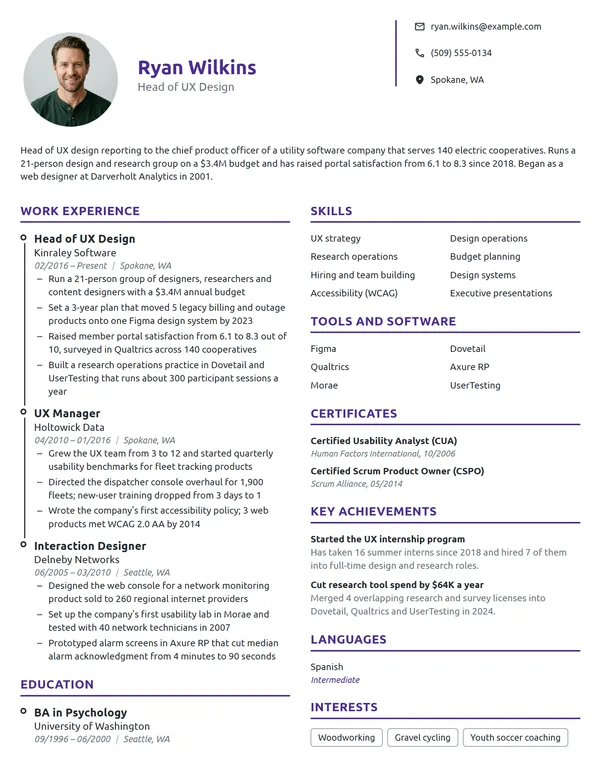
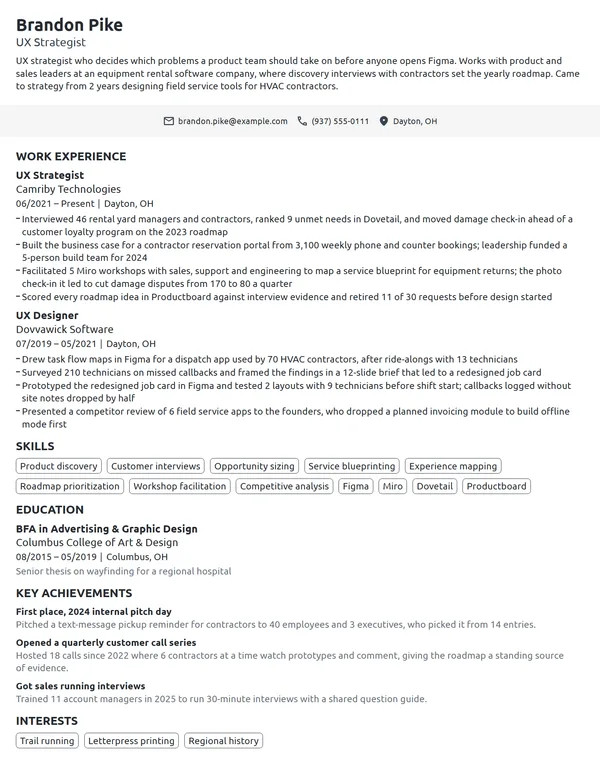
Most US and Canadian resumes carry no photo. A UX team also reads the page itself as a small design test: clear hierarchy, consistent spacing and readable type say more about your skills than color blocks or icons that a parser may drop.
UX designer resume summary vs. objective
If you have held a UX, product design or interaction design title, write a resume summary that names your years, the products and users you design for, and your best measured result. If you are a student or moving into UX from another field, a resume objective fits better: the role you want, your training and the strongest project you can point to.
UX designer resume summary formula
Title with X years designing product type for users. Your strongest research or design outcome, with a number. Main tools and a credential.
Example
UX designer with 6 years designing healthcare and logistics software for clinic staff and dispatchers. Led research and design for a patient intake app now used by 14 clinics. Works in Figma and Maze; NN/g UX Certification.
Don't
Creative, user-focused UX designer passionate about crafting intuitive and delightful digital experiences.
Do
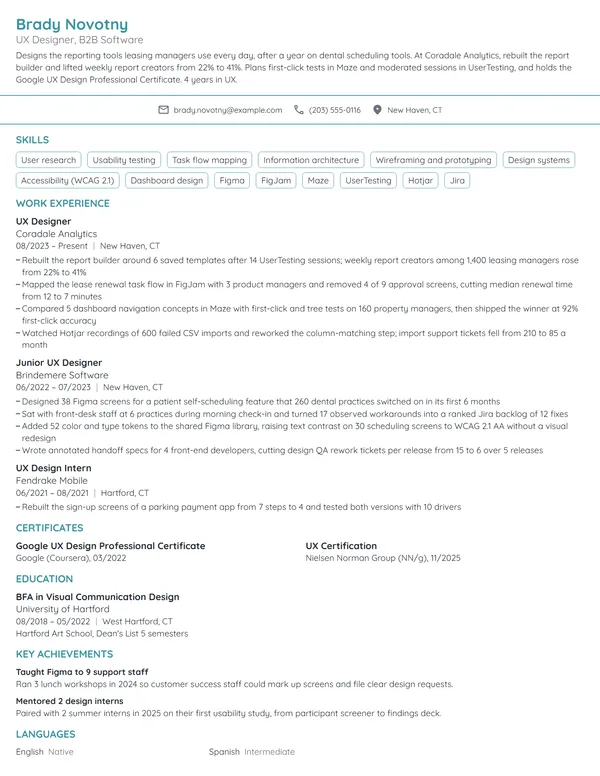
UX designer with 5 years on B2B SaaS products, working in Figma and Dovetail. Simplified an invoicing setup flow and cut setup errors by 40% across 3,000 small-business accounts. Google UX Design Professional Certificate.
Product type, tools, a result with its base and a credential: the second version fits all 4 into 3 sentences.
How to write UX designer work experience bullets with numbers
Each role takes 1 to 4 bullets, the most on recent ones, every bullet starting with a verb. UX work comes with numbers attached: sessions run, participants recruited, steps removed, completion and conversion rates, tickets and calls avoided. Write achievements on your resume with those numbers instead of listing the deliverables you produced.
| Area | What to count | Example bullet |
|---|---|---|
| Usability testing | Sessions, participants, task success rate | Ran 24 moderated sessions on a checkout flow and lifted task success from 61% to 88%. |
| User research | Interviews, surveys, findings the team acted on | Interviewed 18 warehouse supervisors; 5 of the resulting fixes shipped within 2 quarters. |
| Conversion | Sign-ups, trial-to-paid rate, completed purchases | Reworked the plan-selection page; trial-to-paid conversion rose from 4.2% to 5.6% over 90 days. |
| Design systems | Components, teams using them, time saved | Grew a 64-component Figma library that 7 product squads now build from. |
| Accessibility | WCAG level reached, issues fixed, screens covered | Fixed 112 WCAG 2.2 AA issues across 9 screens ahead of an enterprise customer's audit. |
| Support load | Calls, tickets or errors before and after | A self-service reset flow brought password-reset calls down 37%. |
Below, one UX designer's entry is written that way.
Work Experience
- Led research and design for a patient intake app used by 14 clinics, cutting average check-in time from 9 to 4 minutes.
- Ran 30 remote usability sessions in Maze over 3 rounds and resolved 21 of the 26 issues found before release.
- Built 48 documented Figma components with the front-end team, shortening handoff for new screens from 5 days to 2.
- Brought the patient portal to WCAG 2.2 AA, closing 87 audit issues within 2 releases.
- Redesigned the carrier booking flow for 2,300 weekly users; completed bookings rose 18%.
- Interviewed 22 dispatchers and drivers and mapped 4 user workflows that set the product plan for the next 2 quarters.
Don't
Conducted user research and created wireframes and prototypes.
Do
Held 12 contextual interviews with field technicians, then prototyped a fix for their top 3 complaints that took work orders from 11 steps to 6.
The rewrite says who you studied, what you built from it and what changed.
Don't
Worked closely with developers and product managers.
Do
Partnered with 4 engineers and a product manager across 6 two-week sprints to ship a new onboarding flow; day-7 retention moved from 31% to 39%.
UX design skills and software for your resume
Pull 6 to 8 hard skills for your resume from the posting, keeping only those a bullet of yours proves. Research-heavy roles want testing and synthesis near the top; product design roles put interaction design, prototyping and design systems first.
Hard skills for UX designers
- User research
- Usability testing
- Interaction design
- Wireframing
- Prototyping
- Information architecture
- Task flow mapping
- Design systems
- Accessibility (WCAG)
- A/B testing
Soft skills design managers value
- Explaining design decisions
- Running workshops
- Taking critique well
- Turning findings into a story
- Prioritizing with product teams
- Working alongside engineers
O*NET marks Figma, Adobe Creative Cloud, Atlassian Jira and React as in-demand for web and digital interface designers, the O*NET occupation closest to UX design, and lists HTML, CSS and JavaScript as well. Put Figma with your skills if you use it daily, and add research platforms such as Maze, UserTesting, Dovetail or Optimal Workshop only where a bullet shows what you did in them. Front-end code helps on product teams that build in React, but list it only at the level you could use on the job.
UX certifications: Google, NN/g and where to list them
UX has no license, so certificates show training rather than permission to practice. List certifications on your resume under Certificates, naming the issuer and the month each one was earned. Accessibility standards are a common requirement: WCAG 2.2, a W3C Recommendation, sets 3 conformance levels, A, AA and AAA, so write the level your work met.
| Credential | Issued by | What it takes |
|---|---|---|
| Google UX Design Professional Certificate | Google, through Coursera | No degree or experience required; the Coursera listing estimates 6 months at 10 hours a week, with 3 end-to-end projects for a portfolio. |
| UX Certification | Nielsen Norman Group (NN/g) | Pass 5 NN/g courses and their exams, each exam within 35 days of the course. The certification does not expire. |
| UX Master Certification | Nielsen Norman Group (NN/g) | Pass 15 NN/g courses and their exams; the 5 from the UX Certification count toward them. |
How to list a UX certification still in progress
Write the credential's full name, the issuer and your progress, such as the number of courses passed, with the year you expect to finish. Keep it under Certificates and out of your headline until it is earned. NN/g certificates carry a certification ID that employers can check, so copy the name exactly as it appears on yours.
Certificates
- UX Certification, Nielsen Norman Group, 09/2023
- UX Master Certification, Nielsen Norman Group, in progress: 9 of 15 courses passed, expected 2027
How to list a UX degree, bootcamp or certificate
The BLS puts education for web developers and digital designers anywhere from a high school diploma to a bachelor's degree, and notes that some need no specific credential when prior work or projects show what they can do. Common degrees behind UX roles include graphic design, human-computer interaction, information science and psychology. When listing education on a resume, give the degree name, the school and where it is, and the month you graduated; add a GPA only if it is 3.5 or higher and recent.
A full-time bootcamp that ran for months belongs under Education, with its dates and the projects you finished there. A short online course goes under Certificates instead. New graduates can add 1 line on a capstone or thesis if it involved real users.
Education
GPA 3.6. Capstone: tested a transit trip planner with 8 participants and rebuilt its route search.
Entry-level and career-change UX designer resumes
Without a UX job yet, use an entry-level resume layout or start from the junior UX designer page: a short objective, then every piece of work done for real users. Give it the same detail a paid role would get.
- Certificate or bootcamp projects: the user problem, how many people you tested with and what changed between versions.
- Redesigns for a nonprofit or local group: listed under Volunteer Experience, with the organization's name and what it now uses.
- Freelance or contract work: a Work Experience entry with the client type, the deliverable and a result the client measured.
- Design work inside another job: forms, signage, store layouts or internal tools you improved, with a before and after number.
Don't
Aspiring UX designer looking for an opportunity to grow my skills in a creative team.
Do
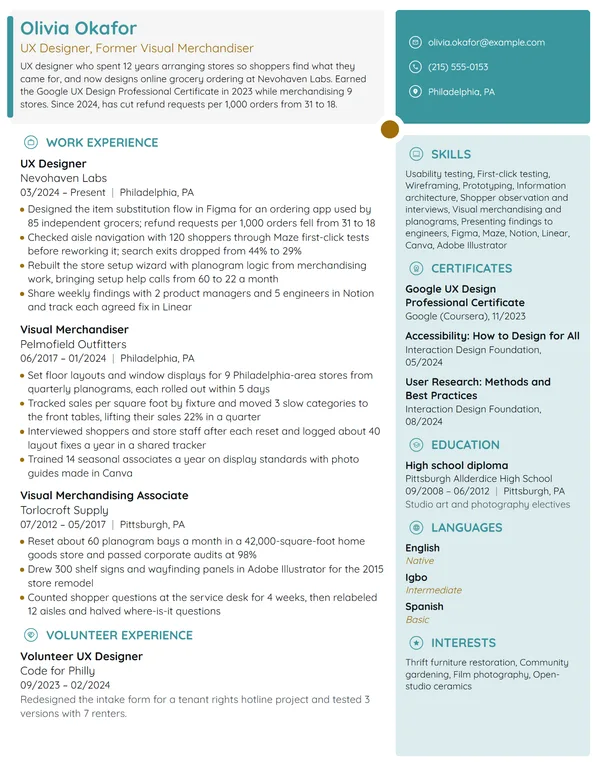
Former high school art teacher with the Google UX Design Professional Certificate and 3 case studies, seeking a junior UX designer role. Ran 15 usability tests for a county library's event sign-up redesign.
Training, a project and a count of users tested turn the objective into evidence.
Switching from retail, teaching, customer support or graphic design, stay with newest-first order and open with the UX credential and your first design role or project. A career-change resume works when the bullets under your old job show the transferable part with numbers, such as layouts tested on shoppers or training materials rewritten from learner feedback. Explain why you switched in a cover letter, next to your portfolio link.
UX Designer resume FAQ
Should I put my UX portfolio link on my resume?
Yes. Put the URL in your header next to your email and phone, paste it into the form's portfolio field, and make sure each case study matches a project your bullets describe. A short URL on your own domain or a portfolio platform is easier to type than a long share link. The examples on this page show the header without one, so add yours.
How long should a UX designer resume be?
1 page covers most UX designers with under 10 years in the field. Lead, principal and head-of-design candidates with 10+ years can use 2 pages, as long as page 1 shows the 2 newest roles and the results with the biggest numbers.
What design tools should a UX designer list?
List Figma if you use it, plus the research, testing and handoff tools the job ad names and you have really worked in, such as Maze, UserTesting, Dovetail or Jira. Keep it to the 4 to 6 tools you could open on day 1, and back each one with a bullet.
Do I need a degree to get a UX designer job?
Not always. The BLS says education for digital designers ranges from a high school diploma to a bachelor's degree, and that work or projects can show ability in place of a credential. O*NET reports that 52% of respondents in the closest occupation say a bachelor's degree is required, so without one, your portfolio and measured bullets carry more weight.
Is the Google UX Design Certificate worth putting on a resume?
Yes, if you are new to UX. List it under Certificates as the Google UX Design Professional Certificate, issued by Google through Coursera, with the month you finished. Once you have 2 or more years of UX work, your shipped results matter more, so keep the line short.
How do I show UX results if my work never launched?
Use the numbers from testing instead of launch metrics. Write how many participants you tested with, how task success or completion time changed between rounds, and what the team decided because of your findings. Say plainly that the project was a concept or was paused.
Should I include my salary expectations on a UX designer resume?
No. Leave pay for the interview or a salary field on the form. For a benchmark, web and digital interface designers, the closest occupation the BLS tracks, earned a median of $104,000 a year in May 2025; your offer depends on your level, your city and the industry.
Next steps
Pick the example nearest your level, keep its structure, and swap in your own research, testing and conversion numbers. Build it in our resume builder, or open one of the resume templates, and send it with your portfolio link and a cover letter that opens with your strongest project.