
Office administrators keep a workplace's paperwork, payments, supplies and systems in order, often as the only person who knows how all of it fits together. Employers hiring for the title check which of those tasks you have owned, how large the office was and whether you already work in their software. The title can mean a front desk with bookkeeping on the side or a role one step below office manager, so a strong resume names the processes you ran and puts a count on each: bills entered a month, staff on timesheets, vendors you manage.
How to Write an Office Administrator Resume - Key Takeaways
- Use the reverse-chronological format on 1 page; save a second page for 10+ years across several offices or a role with staff reporting to you.
- Open with 2 to 3 lines that give your years, the type and size of office you run, your main systems and 1 measured result.
- Choose the 4 or 5 processes you owned, such as billing, timekeeping, vendors, records or onboarding, and give each one a count.
- Name the software the posting asks for, such as QuickBooks Online, Excel or Google Workspace, under Skills, and prove each one in a bullet.
- List MOS, CAP, a QuickBooks credential or a notary commission under Certificates with its issuer and date; none of them is required for the job.
- Keep your birth date and other personal details off the page, then test the file with an ATS resume checker before you send it.
What employers look for in an office administrator resume
Office administrator is a broad title. Search for it on O*NET and the first results are first-line supervisors of office workers, then general office clerks and administrative assistants, so the owner or office manager reading your resume wants to know where on that range you sit. O*NET's profile for general secretaries and administrative assistants lists keeping databases and filing systems, running office equipment and arranging repairs, and scheduling appointments, with payroll and timekeeping as a supplemental task. The BLS adds preparing invoices and basic bookkeeping.
Arrange your resume under headings an applicant tracking system reads cleanly:
- Your name, a headline such as Office Administrator, Notary Public, and contact details
- A short profile of 2 to 3 lines under your name, printed without a heading
- Work Experience, starting with your current office
- Skills, with your office and accounting software named
- Certificates, listing a notary commission ahead of the rest
- Education
- Optional sections: Key Achievements, Volunteer Experience, Languages, Interests
Best format for an office administrator resume
Use the reverse-chronological resume format: your current office at the top, then each earlier job with its title, employer, its city, and start and end dates as MM/YYYY. Many office administrators started at a front desk or as an assistant, and this order shows the steps up as your duties grew. If you are coming from retail, hospitality or the military, keep the same order and let your profile and first bullets carry the office work.
- Best for most office administratorsReverse-chronologicalYour jobs, newest first, with your results under each one.Best for: A steady work history in your field
- FunctionalSkills grouped up top, with a short work history below.Best for: Gaps or very little experience
- CombinationA skills section first, then your full work history.Best for: A career change with strong skills
A 1-page resume covers most office administrator careers, even with 3 or 4 jobs, as long as the bullets thin out on older roles. A second page makes sense only with 10+ years across several offices or a role where you supervised other staff, the point where an office manager resume may fit you better.
| Setting | What to use |
|---|---|
| Length | 1 page; 2 only with 10+ years or supervisory duties |
| Dates | MM/YYYY start and end dates, with Present for the job you hold today |
| Scope line | The office's size and type in your first bullet, such as a 40-person contractor or a 3-attorney firm |
| Typeface | 1 readable font throughout, body text between 10 and 12 pt |
| Photo and personal details | Usually no photo in the US and Canada; leave out birth date, marital status and Social Security number |
| File type | PDF; a .docx only when the portal or the ad requests one |
Most US and Canadian resumes carry no photo, and a small office's owner screening applications by email will judge the page on its order and its numbers.
Office administrator resume summary vs. objective
The test is simple: if you have already run an office's billing, records or supplies, write a summary; if you are moving in from reception, retail or another field, write an objective stating the role you are after and the office work you already handle. These admin assistant summary and objective examples show both styles for office support roles. Draft it last and lift its number from one of your bullets.
Office administrator resume summary formula
Title with X years in types of office, now running the processes you own for office type and size in main systems. 1 timing, cost or volume result. Certification, if any.
Example
Office administrator with 8 years in veterinary and construction offices, now running billing, timekeeping and records for a 38-person mechanical contractor in QuickBooks Online and Google Workspace. Every vendor bill entered within 2 business days of receipt. Microsoft Office Specialist in Excel.
Don't
Organized and reliable office administrator with excellent multitasking skills and a positive attitude.
Do
Office administrator with 5 years at a 25-person insurance agency, handling billing, supply orders and policy records in QuickBooks Desktop and Excel. Cleared a 4-month backlog of 2,100 policy documents in 6 weeks.
The rewrite gives the office size, the processes, the software and a result someone could check.
How to write office administrator work experience bullets with numbers
Your current job takes 3 to 4 verb-first bullets; older jobs take 1 to 4, fewer as they age. Office work is easy to count once you look at it by process: bills a month, staff on each payroll, vendors, files, new hires. The rules for listing work experience on a resume apply here too, and the rows below show which numbers fit each part of the job.
| Area | What to count | Example bullet |
|---|---|---|
| Billing and payables | Invoices a month, payment runs, late fees | Entered 180 vendor invoices a month and paid every one by its due date for 2 years. |
| Payroll and timekeeping | Staff, pay periods, missed or corrected pay dates | Prepared biweekly payroll inputs for 22 hourly staff with 0 missed pay dates in 3 years. |
| Vendors and supplies | Accounts, monthly spend, contracts renewed | Cut office supply spending from $1,450 to $980 a month by consolidating 5 vendors into 2. |
| Records and filing | Files scanned or indexed, retrieval time, retention schedules | Scanned and indexed 3,200 client folders into the shared drive under the firm's retention schedule. |
| Onboarding and accounts | New hires, email accounts, equipment issued | Set up email, phones and building access for 16 new hires in 2025, each ready on day 1. |
| Phones and visitors | Calls a day, lines, visitors | Answered about 60 calls a day on a 6-line phone system and routed each to the right estimator. |
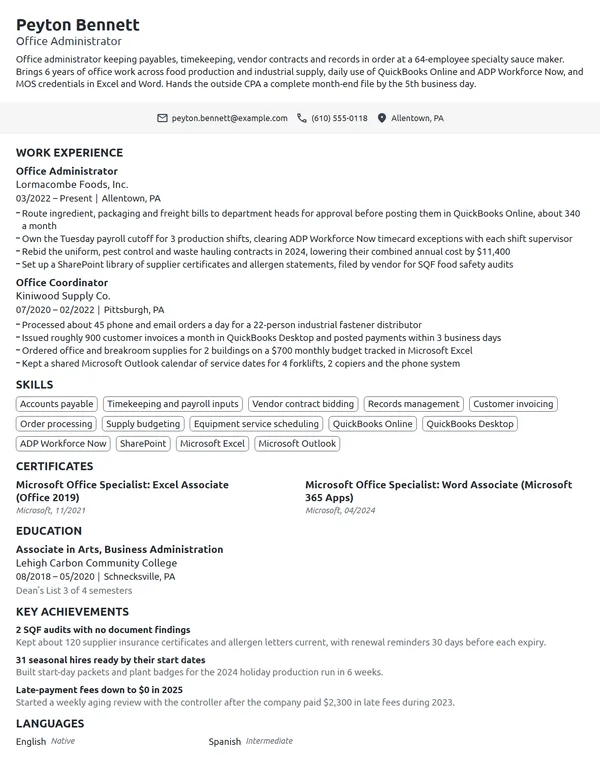
This sample entry puts those counts into an 8-year history. The current job carries 4 bullets that each cover a different process, and the earlier assistant role keeps the 2 results that still matter.
Work Experience
- Enter and code about 260 vendor bills a month in QuickBooks Online, matching each to its job number before the 2 monthly check runs.
- Send hours for 38 field and office staff to the outside payroll provider each Monday, after checking every timesheet against the job schedule.
- Moved 11 years of paper job files into a shared Google Drive structure, clearing 14 file cabinets from the back office.
- Renegotiated the copier lease and 3 supply accounts, saving $6,200 a year.
- Booked about 70 appointments a day for 4 veterinarians and set up reminder texts that cut no-shows from 9% to 4%.
- Balanced the cash drawer and card batches each night, about $9,000 a day.
Don't
Responsible for ordering office supplies.
Do
Replaced ad hoc supply orders for 3 floors with 1 standing monthly order, cutting rush deliveries from 12 to 2 a quarter.
Don't
Helped with payroll.
Do
Reviewed punches for 29 hourly staff every 2 weeks in Kronos Workforce Timekeeper and fixed about 6 errors per period before payroll closed.
The rewrite says exactly which part of payroll was yours, with the headcount and the system.
Office administrator skills and software for your resume
Your Skills list should hold 6 to 8 hard skills for your resume, each taken from the posting and each backed by a bullet. Leave the soft skills to your results: a vendor bill entered on time says more about accuracy than the word does.
Hard skills for office administrators
- Accounts payable and vendor billing
- Payroll and timekeeping inputs
- Records management and filing systems
- Calendar and appointment scheduling
- Vendor and supply management
- Office equipment and phone systems
- New hire paperwork and onboarding
- Data entry and database upkeep
- Business correspondence
- Expense reporting
Soft skills employers value in office administrators
- Prioritizing competing requests
- Discretion with confidential records
- Clear phone and email manner
- Accuracy with figures
- Working without close supervision
- Problem solving with vendors
Put your software on the Skills list and show each program at work in a bullet. O*NET flags Microsoft Excel, Outlook, Word, PowerPoint and the Microsoft Office suite as in-demand technology for general office support, and lists Intuit QuickBooks, SAP Concur, Google Workspace, Microsoft Teams, Zoom and Kronos Workforce Timekeeper among its hot technologies. Match the suite the posting uses: an office on Google Workspace reads Microsoft 365 as a gap, even though the skills carry over.
MOS, CAP and notary: certifications for office administrators
No certification is required to work as an office administrator, so each one you add is proof of a specific skill. List certifications on your resume in the Certificates section with the issuer and the date, and repeat the one that matches the posting in your profile.
| Credential | Issued by | What it takes |
|---|---|---|
| Microsoft Office Specialist: Excel Associate (Microsoft 365 Apps) | Microsoft | Pass the 50-minute exam MO-210. Microsoft suggests about 150 hours of instruction and hands-on use, and lists a renewal frequency of 60 months. |
| Certified Administrative Professional (CAP) | International Association of Administrative Professionals (IAAP) | An exam plus more than 2 years of work experience, according to the Department of Labor's My Next Move, with renewal every 5 years. |
| Intuit QuickBooks Certified User | Intuit, delivered through Certiport | An exam on using QuickBooks in practical bookkeeping tasks. |
| Notary Public | Your state | Rules vary by state. In Idaho, you apply to the Secretary of State with a surety bond and a $30 filing fee, and no test is required. |
How to list a notary commission
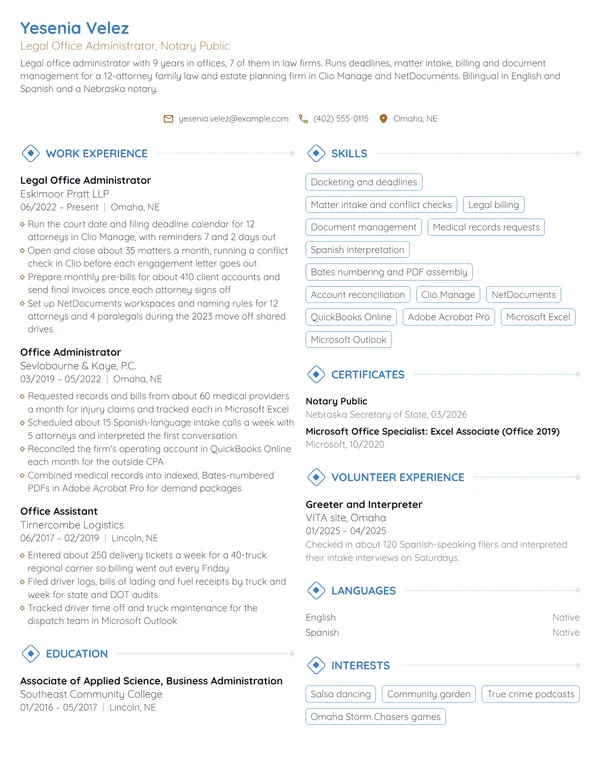
Office administrators in law firms, title offices and small businesses may notarize documents for the company, and some postings ask for a commission. Put the commission first under Certificates with the state and the date you were commissioned, and add Notary Public to your headline when the job ad mentions notarizing.
Certificates
- Notary Public, State of Idaho, commissioned 09/2023
- Microsoft Office Specialist: Excel Associate (Microsoft 365 Apps), Microsoft, 03/2024
- Intuit QuickBooks Certified User, Intuit, 10/2022
Education for office administrators: diploma, associate degree or certificate
For secretaries and administrative assistants, the BLS gives a high school diploma as the typical entry-level education and says a bachelor's degree typically is not required. In O*NET's survey of the same occupation, 50% of respondents said the job requires a high school diploma, 22% an associate degree and 11% a bachelor's. Follow the standard rules for listing education on a resume: credential, school, city and date, below Work Experience once you have a few years in the job.
The BLS also notes that some community colleges and technical schools run courses or programs in administrative fields. If you finished one, write its exact name and degree type, since a hiring owner may not know what an Administrative Specialist or Office Technology program covers until it is spelled out.
Education
Entry-level and career-change office administrator resumes
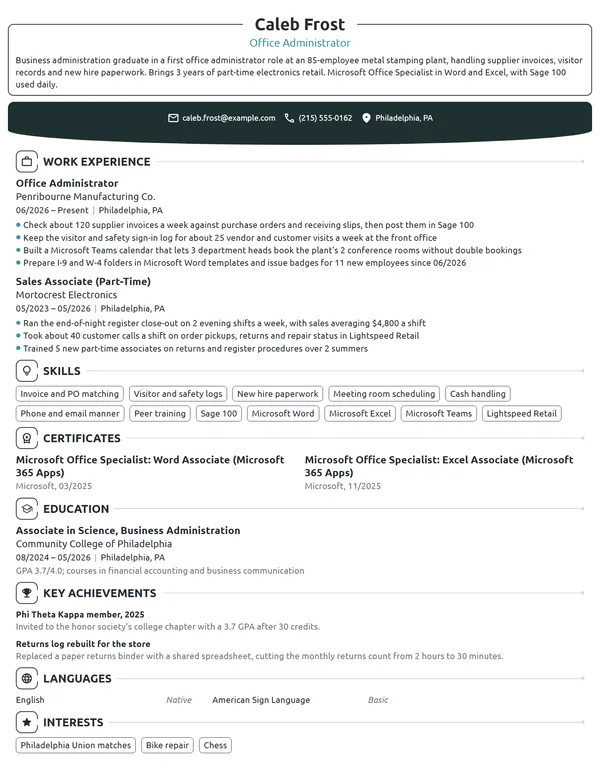
For a first office job, start from an entry-level resume layout: a short objective, Education higher on the page, and every piece of experience that shows you can handle money, records and people. The BLS says high school graduates comfortable with word processing and spreadsheets usually qualify for entry-level roles, so make that comfort visible with the work you did in them.
- An office or business program: practicum hours, the MOS exams you passed and the software the coursework used.
- Front desk, retail or restaurant shifts: drawers balanced, calls taken, schedules built, stock ordered.
- Volunteer treasurer or secretary roles: dues collected, minutes taken, budget size, listed under Volunteer Experience.
- Temp agency assignments: the agency as the employer, with the client offices and what you did there in the bullets.
Don't
Hardworking professional seeking an office administrator position where I can grow my skills.
Do
Retail assistant manager moving into office administration after 6 years of scheduling 14 staff, placing weekly stock orders and balancing daily deposits. Microsoft Office Specialist in Excel since 2026.
An objective still needs evidence: years, a headcount and the office tasks you already do.
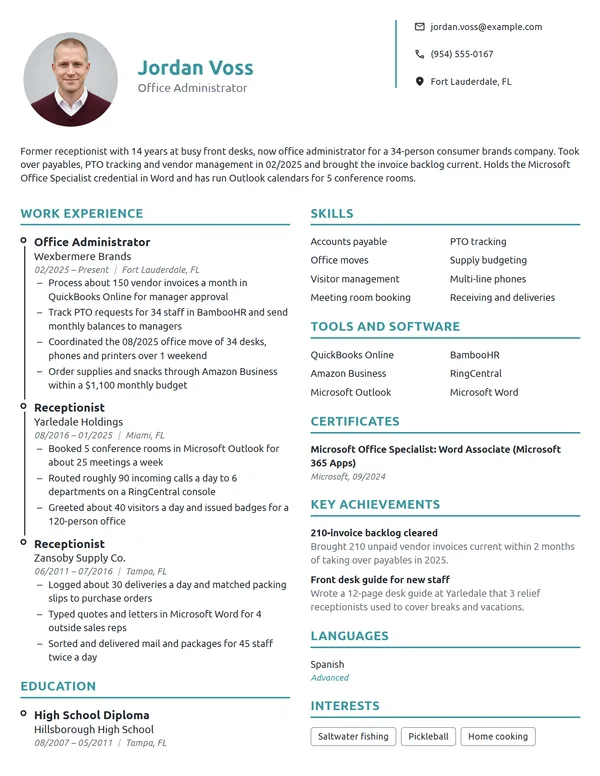
Receptionists, bank tellers, retail managers and military administrative specialists already do much of this work. On a career-change resume, keep your real job titles and move the office tasks, such as billing, scheduling, supply orders or records, to the top of each entry. Explain the switch in a few lines when writing a cover letter, and put your strongest office number in its first paragraph.
Office Administrator resume FAQ
What is the difference between an office administrator and an office manager resume?
Mainly supervision. An office manager resume leads with the staff who reported to them, budgets and hiring. An office administrator resume leads with the processes you run yourself, such as billing, timekeeping, records and vendors. If people reported to you, say how many in your first bullet.
How long should an office administrator resume be?
Use 1 page in nearly every case. Trim the bullets on older jobs before you consider a second page, and use 2 pages only with 10+ years across several offices or a role where you supervised staff.
What software should an office administrator list on a resume?
The programs in the posting that you can use on day 1, by their exact names: Excel, Outlook, QuickBooks Online, Google Workspace, Microsoft Teams or the payroll system. Back each one with a bullet describing what you did in it, and leave off tools you have only seen.
Do office administrators need a certification?
No. The BLS says secretaries and administrative assistants typically learn their skills through on-the-job training that lasts a few weeks. A Microsoft Office Specialist exam, the IAAP's CAP or a QuickBooks credential can still back up a skill the posting asks for, so list any you hold under Certificates.
Should I put bookkeeping on an office administrator resume?
Yes, if you did it, with the exact scope. Write how many bills or invoices you entered, whether you reconciled accounts or only coded entries, and which software you used. Leave reconciliations and financial statements to the bookkeeper or accountant if they handled them.
How do I write a church office administrator resume?
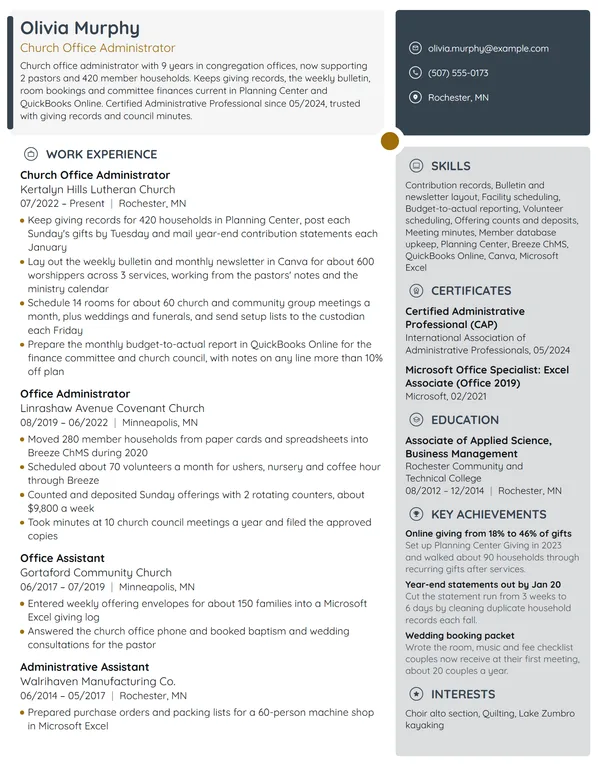
Show the church's size and the work only a church office does: weekly bulletins, giving and contribution records, volunteer and room schedules, and support for pastors and committees. Name the church management software the posting lists if you have used it, and count members, families or events.
How do I tailor an office administrator resume for a law firm?
Lead with the work a firm needs from its office: calendars and deadlines kept for attorneys, client files opened and closed, billing entered, and confidential records handled. Name the practice management software from the posting, list a notary commission if you hold one, and do not claim paralegal tasks you did not do.
How much do office administrators make?
The BLS publishes no wage for the title itself. For secretaries and administrative assistants, except legal, medical, and executive, the BLS reports a median annual wage of $47,540 in May 2025. Leave pay expectations off your resume and discuss them in the interview.
Next steps
Start from the example nearest your office and your level, keep its structure, and put your own counts into every bullet. Build it in our resume builder or start from one of the resume templates, and send it alongside a cover letter naming the processes you would take over.