
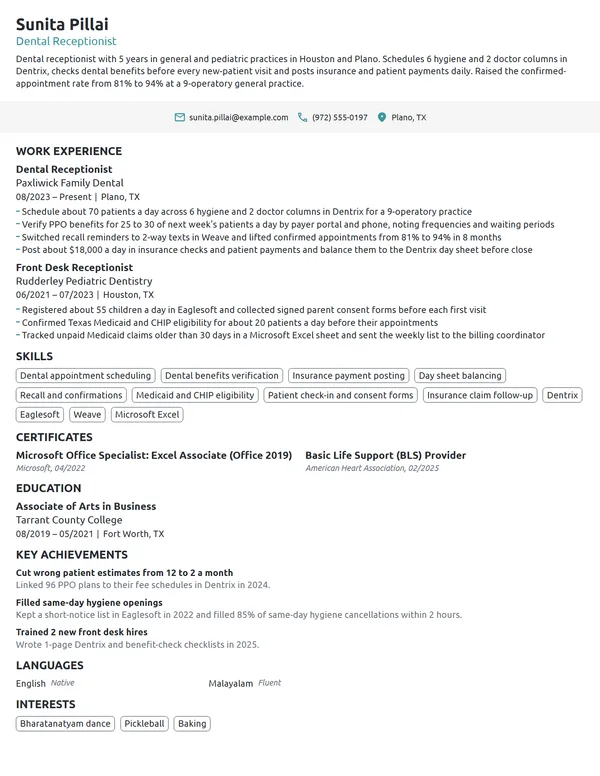
A receptionist keeps an office running from the front desk, and that is what a hiring manager wants your resume to show. They check how busy your desk was, which phone, scheduling and office software you used, and how you treated callers and visitors on a hectic day. Front desk duties read much the same from one job to the next, so your numbers and the setting you worked in are what make you stand out. The sections below show where each one goes.
How to Write a Receptionist Resume - Key Takeaways
- Stick to reverse-chronological order on 1 page; a receptionist resume rarely needs a second.
- Open with a 2- to 3-line summary that names your setting, your daily call or visitor volume and 1 result, such as fewer no-shows.
- Give every bullet a front desk number: calls a day, phone lines, visitors checked in, appointments booked or dollars collected.
- Name the exact phone, scheduling and office software from the job ad, starting with Outlook, Word and Excel.
- Most offices train receptionists on the job and require no certification, so list a Microsoft Office Specialist exam or IAAP's CAP under Certificates only if you hold one.
- Put typing speed in Skills and a second language in Languages, then test the file in an ATS resume checker before you apply.
What hiring managers look for in a receptionist resume
The person hiring a receptionist is usually an office manager, a practice manager or the owner, and they read your resume for 3 things: how busy your desk was, how you kept it accurate and how you treated people under pressure. The BLS lists answering calls and taking messages, scheduling and confirming appointments, checking in visitors and entering customer information into a database as typical duties. O*NET adds receiving payments, recording receipts and resolving complaints.
The setting changes what a manager scans for. BLS figures put 42% of receptionists in healthcare and social assistance, where the desk also collects patient information and sometimes handles billing and insurance payments. In large corporations and government offices the job can include a security role, so visitor logs and badges belong on the page. Build your resume with these sections:
- Name, a headline such as Front Desk Receptionist or Bilingual Receptionist, and contact details
- A 2- to 3-line summary at the top; it prints without a heading
- Work Experience, with your current or latest desk first
- Skills, with your phone, scheduling and office software in the same list
- Certificates, if you hold any
- Education
- Languages, if you speak more than 1
- Optional: Key Achievements or Volunteer Experience
Best format for a receptionist resume
Use the reverse-chronological resume format: your latest job first, each with the title, the employer, its city and the MM/YYYY dates. Front desk hiring is about recent, steady work in a similar office, and this layout puts that on the top half of page 1. If most of your history is retail, food service or a call center, keep the same order and let the summary and first bullets carry the overlap.
- Best for most receptionistsReverse-chronologicalYour jobs, newest first, with your results under each one.Best for: A steady work history in your field
- FunctionalSkills grouped up top, with a short work history below.Best for: Gaps or very little experience
- CombinationA skills section first, then your full work history.Best for: A career change with strong skills
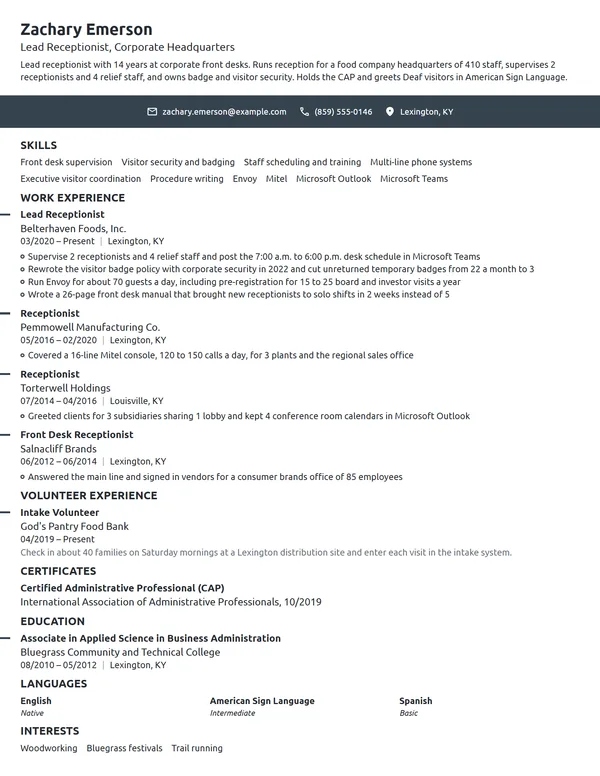
Keep it to 1 page. Even with 10+ years at front desks, the last 3 jobs and their numbers tell a manager what they need; older roles can shrink to a single line or come off. A second page only makes sense when the posting is closer to an office manager or administrative assistant role and your history backs that up.
| Setting | What to use |
|---|---|
| Length | 1 page at every level |
| Dates | MM/YYYY for start and end, Present for the desk you work at now |
| Job title line | Your exact title plus the setting when it helps: Receptionist, Pediatric Clinic |
| Typeface | 1 clean font, 10.5 to 12 pt in the body and a little larger for headings |
| Photo and personal data | A photo is unusual in the US and Canada; skip your age, family details and Social Security number |
| File | A PDF named with your name and the job title, unless the application form asks for Word |
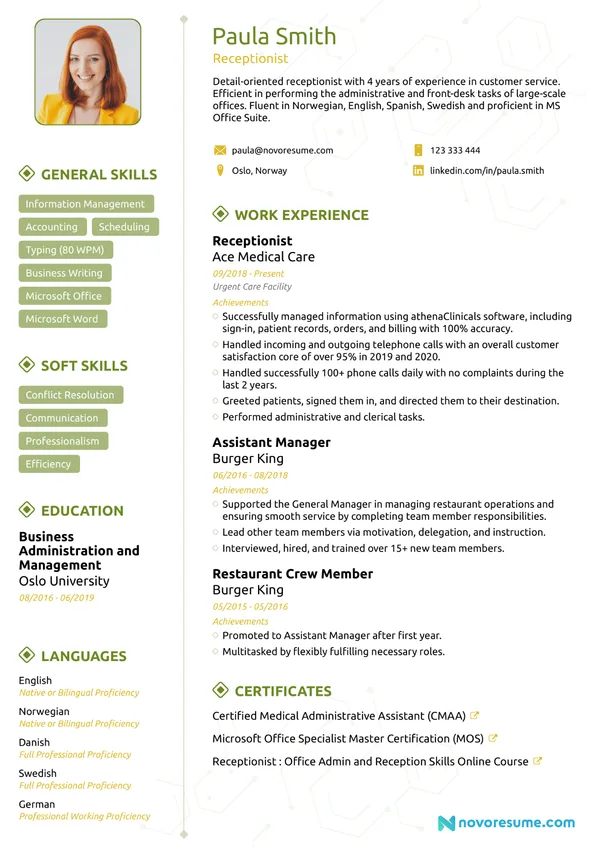
Most US and Canadian resumes carry no photo, and a front desk manager will meet you at the interview anyway. Spend the space on your call volume and your software instead.
Receptionist resume summary vs. objective
Pick by your history. If you have worked a front desk, a reception counter or a check-in window, write a resume summary that names the setting, your volume and 1 result. If you have not, write a resume objective that names the desk you want and the customer-facing work you have done. Keep either to 3 lines and reuse a number from your bullets.
Receptionist resume summary formula
Title with X years at the front desk of setting, handling calls or visitors a day. Your best scheduling, call or payment win, as a figure. Software, language or certificate.
Example
Receptionist with 6 years at the front desk of a law firm and a family medicine clinic, handling about 90 calls a day. Ended double-booked conference rooms by merging 3 shared calendars into Outlook. Bilingual in English and Spanish, with the Microsoft Office Specialist certificate in Word.
Don't
Friendly and professional receptionist with excellent communication skills and a passion for helping people.
Do
Front desk receptionist with 3 years at a 4-chair dental office, checking in about 45 patients a day and verifying insurance before each visit. Fluent in English and Vietnamese.
The rewrite gives a setting, a daily volume, a task the manager needs and a language, all things a reader can check.
How to write receptionist work experience bullets with numbers
Write 3 to 4 bullets for your current desk and 1 to 3 for older ones. Start each with a verb, then add the count and its base: calls a day, lines on the phone system, people you scheduled for. When you list work experience on a resume for a front desk job, the duties are familiar to every manager, so the numbers are what set your desk apart from the next applicant's.
| Area | What to count | Example bullet |
|---|---|---|
| Phones | Calls a day, lines, hold time, departments you route to | Answered about 70 calls a day on an 8-line system and kept hold times under 30 seconds. |
| Visitors | Check-ins a day, badges, sign-in logs | Checked in 40 visitors a day, issued temporary badges and kept the lobby log audit-ready. |
| Scheduling | Appointments booked, calendars kept, no-show rate | Booked about 50 appointments a day across 3 provider schedules with reminder texts the day before. |
| Payments | Copays, cash drawer, receipts | Collected about $4,000 a week in copays and card payments and balanced the drawer every shift. |
| Mail and records | Deliveries, documents scanned, files kept | Sorted mail and courier deliveries for 3 floors and logged every package in a shared tracker. |
| Systems | Migrations, templates, records entered | Moved 1,200 client records from paper cards into the new scheduling system in 6 weeks. |
Here is how those numbers sit in a real entry. The current desk gets 4 bullets with a count in each, and the older clinic job gets 2.
Work Experience
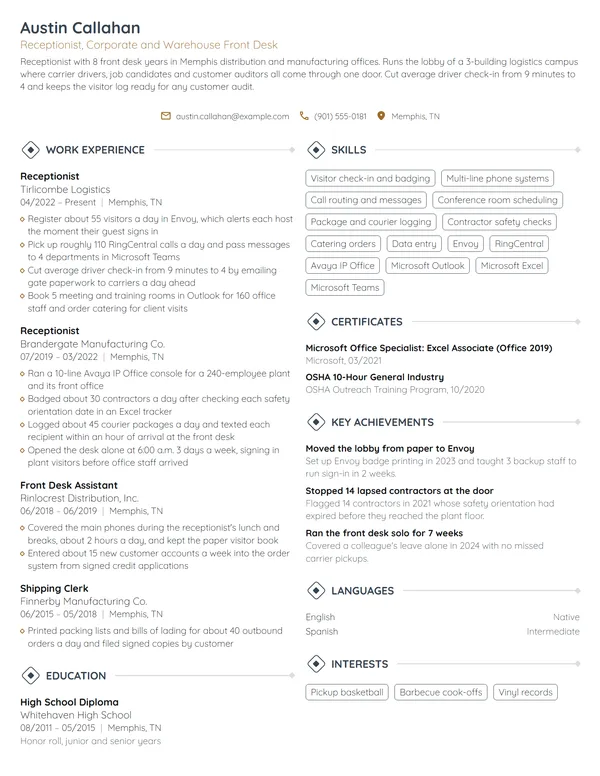
- Answer about 90 calls a day on a 12-line phone system and route each one to the right desk for 14 attorneys.
- Greet and check in 25 to 35 clients and visitors a day, confirm appointments and escort each one to the meeting room.
- Cut conference room double bookings from 6 a month to 0 by merging 3 shared calendars into Outlook.
- Scan, name and file about 150 incoming documents a week so attorneys can find them the same day.
- Checked in about 60 patients a day for 5 providers, scanning insurance cards and collecting copays.
- Lowered the no-show rate from 11% to 7% in 1 year by calling every patient booked for the next morning.
Don't
Answered phones and transferred calls.
Do
Handled about 80 calls a day on a 6-line system, routing callers to 10 departments and taking messages in Outlook.
The rewrite shows the size of the switchboard and the system, not just the task.
Don't
Responsible for scheduling appointments.
Do
Booked 35 appointments a day for 4 stylists and cut weekly no-shows from 9 to 4 with confirmation texts.
Receptionist skills and front desk software for your resume
Pick 6 to 8 skills the posting asks for and that your bullets already show. Hard skills go in the list; customer service skills such as calming an upset caller are stronger when a bullet proves them, for example a complaint you resolved before it reached the manager.
Hard skills for receptionists
- Multi-line phone systems
- Call screening and routing
- Appointment scheduling
- Visitor check-in and badging
- Data entry
- Payment processing and cash handling
- Insurance card verification
- Mail and package logging
- Filing and document scanning
- Typing speed (WPM)
Soft skills office managers value
- Calm with a full lobby
- Clear phone manner
- Discretion with private information
- Handling complaints
- Juggling interruptions
- Reliability on every shift
List your software in the same Skills section, then mention each program in a bullet that shows what you did with it. O*NET flags Microsoft Outlook, Word, Excel and Microsoft Office as in-demand technology for receptionists and information clerks, with Intuit QuickBooks and Google Docs as hot technology. The BLS adds that word processing and spreadsheet skills may be particularly helpful. For phone, scheduling and practice software, write the product the job ad names if you have used it, and skip programs you have only seen over a coworker's shoulder.
Certifications for receptionists: optional, but useful
Receptionist jobs carry no license, and the BLS says most receptionists learn the work on the job in a few days to a month. A certificate still helps when you are new or moving toward office administration, so list certifications on your resume in a Certificates section with the exact name, the issuer and the month and year you earned it.
| Credential | Issued by | What it takes |
|---|---|---|
| Microsoft Office Specialist: Word Associate (Office 2019) | Microsoft, with exams delivered by Certiport | Pass exam MO-100, a 50-minute test in the program itself. Microsoft suggests about 150 hours of instruction and hands-on use first; renewal is every 60 months. |
| Microsoft Office Specialist: Excel Associate (Office 2019) | Microsoft, with exams delivered by Certiport | Pass exam MO-200, also 50 minutes, covering worksheets, tables, formulas and charts. |
| Certified Administrative Professional (CAP) | International Association of Administrative Professionals (IAAP) | An exam built for administrative professionals; check IAAP's current eligibility rules, which combine education and work experience, before you list a planned date. |
Certificates
- Microsoft Office Specialist: Excel Associate (Office 2019), Microsoft, 09/2024
- Microsoft Office Specialist: Word Associate (Office 2019), Microsoft, 04/2021
Where typing speed and a second language go
Typing speed belongs in Skills, written as a tested number: Typing, 60 WPM. Use a score you could repeat on a test at the interview. A second language gets its own Languages section with a level, such as Spanish (fluent), and earns a place in your headline when the job ad asks for a bilingual receptionist.
How to list a high school diploma, college or certificate
The BLS lists a high school diploma or equivalent as the usual requirement for receptionists. O*NET's survey of the job shows the range: 49% of respondents named a high school diploma, 26% some college with no degree, and 21% a post-secondary certificate. If a diploma or GED is your highest level, list it; if you have college credits or a certificate, list that instead and drop the high school line.
Follow the standard rules for listing education on a resume: credential, school, city and the month and year you graduated. Coursework is worth 1 line only when you have little work history and it matches the desk, such as business office technology or medical terminology. Once you have a year of front desk work, Education moves below Work Experience.
Education
Business computer applications and Spanish IV electives.
Entry-level and career-change receptionist resumes
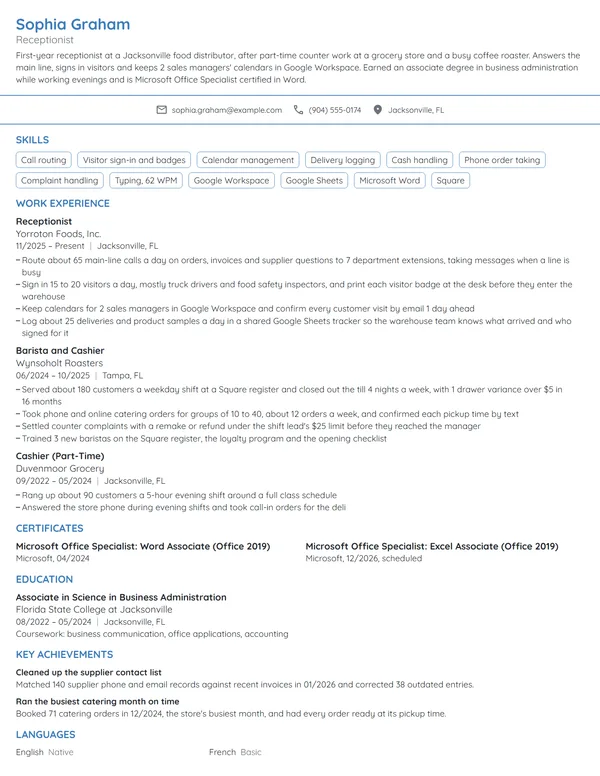
Plenty of receptionists start from a counter, a register or a phone queue. With no front desk job yet, use an entry-level resume layout: a 3-line objective, then the work that shows you can greet people, take payments and keep records straight. Count it the way a front desk would.
- Retail or cashier work: customers served a shift, drawer balanced, returns and complaints handled.
- Restaurant host stand: covers seated a night, reservations booked, the waitlist system you used.
- Call center work: calls a day, average handle time, satisfaction or resolution scores your team tracked.
- Volunteer front desk or event check-in: listed under Volunteer Experience with the number of guests you signed in.
Don't
Hardworking individual looking for a receptionist position where I can grow my skills.
Do
Cashier with 2 years at a busy grocery store, serving about 200 customers a shift and balancing the drawer every close. Seeking a front desk receptionist role; types 55 WPM.
An objective still needs evidence: a setting, a volume and a skill the desk uses.
Changing careers from teaching, hospitality or healthcare support works the same way: stay with reverse-chronological order, and move your most front-desk-like tasks to the top of each job. A career-change resume reads best when the summary names the receptionist role directly. For a medical receptionist opening, lead with any patient check-in, scheduling or insurance work. Explain the move in your cover letter, and our receptionist cover letter examples show how to fit it into 2 or 3 sentences.
Receptionist resume FAQ
Do you need a certification to be a receptionist?
No. The BLS says receptionists typically need a high school diploma or equivalent and learn the job through short on-the-job training. A Microsoft Office Specialist exam in Word or Excel, or IAAP's CAP for those heading into administration, can still help a resume with little front desk history.
How long should a receptionist resume be?
Keep it to 1 page. List your last 3 jobs with their call, visitor and scheduling numbers, and shorten or cut anything older than about 10 years unless it was also front desk work.
What software should I list on a receptionist resume?
Start with Outlook, Word and Excel, which O*NET marks as in-demand for receptionists. Then add the exact phone, scheduling or practice system named in the job ad if you have used it, and back each one with a bullet.
Should I put typing speed on my receptionist resume?
Yes, if it is a tested number you can repeat. Write it in Skills as Typing, 60 WPM, using your real score. Leave it off if you have never measured it, since some offices test applicants at the interview.
How do I write a medical or dental receptionist resume?
Name the practice type in your summary and lead with patient work: check-ins a day, providers you scheduled for, insurance cards verified and copays collected. Add any privacy or HIPAA training your employer gave you, and copy the practice software name from the job ad if you know it.
Can I become a receptionist with no experience?
Yes. Most offices train new receptionists on the job. Show retail, host, call center or volunteer check-in work with numbers, write a short objective, and list typing speed and any second language.
Should I list salary expectations on a receptionist resume?
No. Pay belongs on the application form or in the interview. As a benchmark, BLS data put the median hourly wage for receptionists at $18.27 in May 2025, and offers vary by city, setting and shift.
Next steps
Choose the example nearest to your setting and level, keep its layout, and swap in your own call, visitor and scheduling numbers. Build it in our resume builder or pick one of the resume templates, then send it with a short cover letter that names the office and the busiest part of your current desk.