

You need a resume, and you need it fast.
Microsoft Word is the first tool that comes to mind.
It’s been around for a long time, it’s already installed on your computer, and it seems like a straightforward way to condense your experience on a page. But just because Word is an obvious choice doesn’t mean it’s the best option today.
Word has limited resume templates, its formatting is notoriously tricky, and it will take you a long time to create a resume with it. So, are Word resumes even any good?
In this article, we’re going to break down:
- Are Word Resumes Any Good?
- Word VS Professional Resume Builders
- When to Use Word (and When NOT to)
…and more!
Let’s dive in.
Want to make a great resume and impress the hiring manager? Use our professional resume builder to create your resume in minutes!
Choose a resume template to get started.
Can You Use Word to Make a Resume?
Yes, you can use Microsoft Word to create a resume. In fact, it’s one of the most commonly used tools for creating a resume. Word offers a handful of built-in resume templates, including “Polished,” “Columns,” and “Bold Modern.”
You can also find other Word-friendly templates online. Pick one, start filling in your information, and you’re on your way to having a basic resume. Unfortunately, it’s not that simple. Word templates are often outdated or overly generic, so your resume likely won’t stand out to hiring managers.
Even when the design looks okay at a glance, as soon as you try to tweak a section, change the layout, or add an extra heading, everything falls apart. Formatting a Word resume is a game of trial and error that can take a long time to win.
You can also build your own resume from scratch using Word’s tools like headings, bullet points, and tables. This gives you more control over layout and style, but it also means you’re responsible for ensuring everything looks polished and professional, which is time-consuming.
💡
Pro Tip
New to making a resume? Check out our beginner-friendly guide!
Are Word Resumes Any Good?
You could use Word to create your resume, but that doesn’t necessarily make it a great idea.
Word was built as a general-purpose word processor, not a resume design tool. So while it technically works, it often ends up creating more problems than it solves when you’re trying to make a resume.
Additionally, Word templates aren’t ATS-friendly. Many of them use tables, columns, or design elements that don’t pass through applicant tracking systems. The software could reject your resume before a human even sees it.
And if you’re thinking of tailoring your resume for different roles (which you should definitely do), Word just turns that into a chore. Rearranging sections or changing the design can easily disrupt the layout and force you to start from scratch.
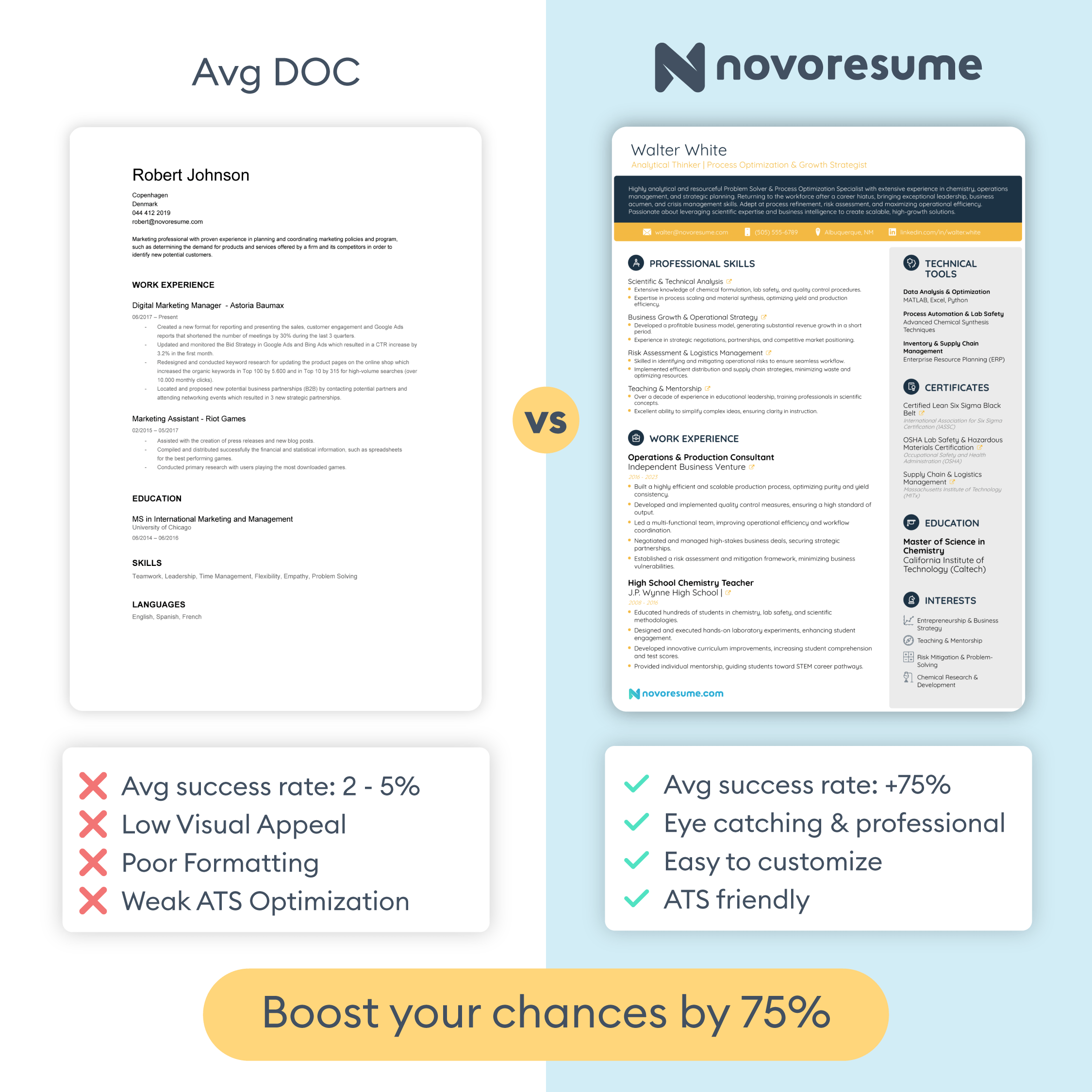
Overview of Word Resume Features
If you’re thinking about using Microsoft Word for your resume, here are some of the key issues you’re likely to run into:
- Rigid layout structure. Word templates waste space with oversized margins, inconsistent spacing, and bulky sections. That makes it harder to fit your experience onto one page without it looking cramped or uneven.
- Frustrating formatting. Want to move a section? Tweak a font size? Add a new bullet point? Be prepared to fight with the formatting at every step. One small change can disrupt alignment across the entire document, and fixing it often requires hours of trial and error.
- Uncompetitive designs. Many Word resume templates are either too plain or too flashy. Some look like something out of the early 2000s, while others pack in so many bold design elements that they don’t translate well to a job application.
- Limited customization. While Word is a versatile tool, it’s not made for layout-level design. You can’t easily switch colors, rearrange sections, or experiment with visual hierarchy without the risk of breaking the document’s structure entirely.
- Potential ATS issues. Most Word templates aren’t designed with applicant tracking systems in mind. Hidden tables, rigid columns, or graphics might stop the ATS from parsing your information correctly.
Word VS Professional Resume Builders
Microsoft Word can create just about any type of document you throw at it, whether it’s essays, reports, meeting minutes, or formal letters.
But that’s also the problem. It’s a general-purpose tool, not one designed specifically to build resumes that meet modern hiring standards.
Resume builders, on the other hand, are built precisely for that purpose. The templates are designed to be visually appealing and structured for readability. They follow best practices for spacing, layout, and content hierarchy, ensuring your resume stays professional and easy to scan in seconds.
You shouldn’t need to wrestle with formatting, and that’s why customizing your resume using a builder is fast and intuitive. You can rearrange sections, change fonts and colors, and experiment with different layouts without worrying about everything falling apart. What you see is what you get, and it’s always polished.
More importantly, effective resume builders account for applicant tracking systems (ATS) from the start. While Word templates often include tables, boxes, or columns that can confuse the ATS, resume builders keep the formatting neat and optimized for parsing. Your information will always display correctly.
With a resume builder, you can also easily create multiple versions of your resume for different roles, export to PDF or TXT, and generate matching cover letters for a full application package. Everything is streamlined to save you time while guaranteeing high-quality results.
When to Use Word Resumes (And When Not To)
When does it make sense to use Word for your resume?
If you’re on a serious job hunt, rarely.
If you’re putting together a quick draft of your resume to share with a friend for feedback, working on a school project, or just trying to jot down your experience before transferring it into a better format later, Word is fine. It’s accessible, familiar, and good for getting your ideas down on paper.
But if you’re applying for real jobs, especially in competitive industries or for roles you actually want, it falls short of being an actual resume builder.
You’re more likely to waste time on formatting, end up with a generic design, and run into problems with applicant tracking systems that never even show your resume to a hiring manager.
That doesn’t mean you need to spend a lot to upgrade your tools, though. At Novorésumé, we offer a free Basic plan that lets you build a professional, ATS-friendly resume in minutes.
You get access to eight polished templates, easy customization, and instant PDF downloads, without any formatting struggles or hidden fees.
So, if you're serious about landing interviews, it’s worth switching to a tool that's actually built for the task by trying our resume builder for free.
You only get to make a first impression with your resume, so make sure it’s a good one.
Frequently Asked Questions About Microsoft Word Resume Templates
Key Takeaways
- Microsoft Word can technically create a resume, but it wasn't designed for it. You'll spend more time fighting formatting than actually writing your content.
- Most Word resume templates are outdated, generic, and not optimized for applicant tracking systems, which means your resume could get filtered out before a hiring manager ever sees it.
- Professional resume builders offer ATS-friendly templates, easy customization, and structured layouts that save you time and produce better results.
- If you need a quick draft or a placeholder document, Word is fine. But for actual job applications, a purpose-built resume tool is worth the switch.
- Always export your final resume as a PDF to preserve formatting, unless the job posting specifically requests a different file type.
Related posts

Resume & CV Writing Tips
Want your resume to stand out? Here are the 101+ skills to put on a resume (that are in high demand in 2025)! Learn more.

Resume & CV Writing Tips
Want to create a resume that stands out? You should include some hobbies and interests. Discover 40+ essential hobbies for your resume with this guide!

Resume & CV Writing Tips
Discover everything you need about applicant tracking systems (ATS)! Learn what ATS is, how it works, and how to get through it.